
Visual feedback tool for developers and AI coding agents
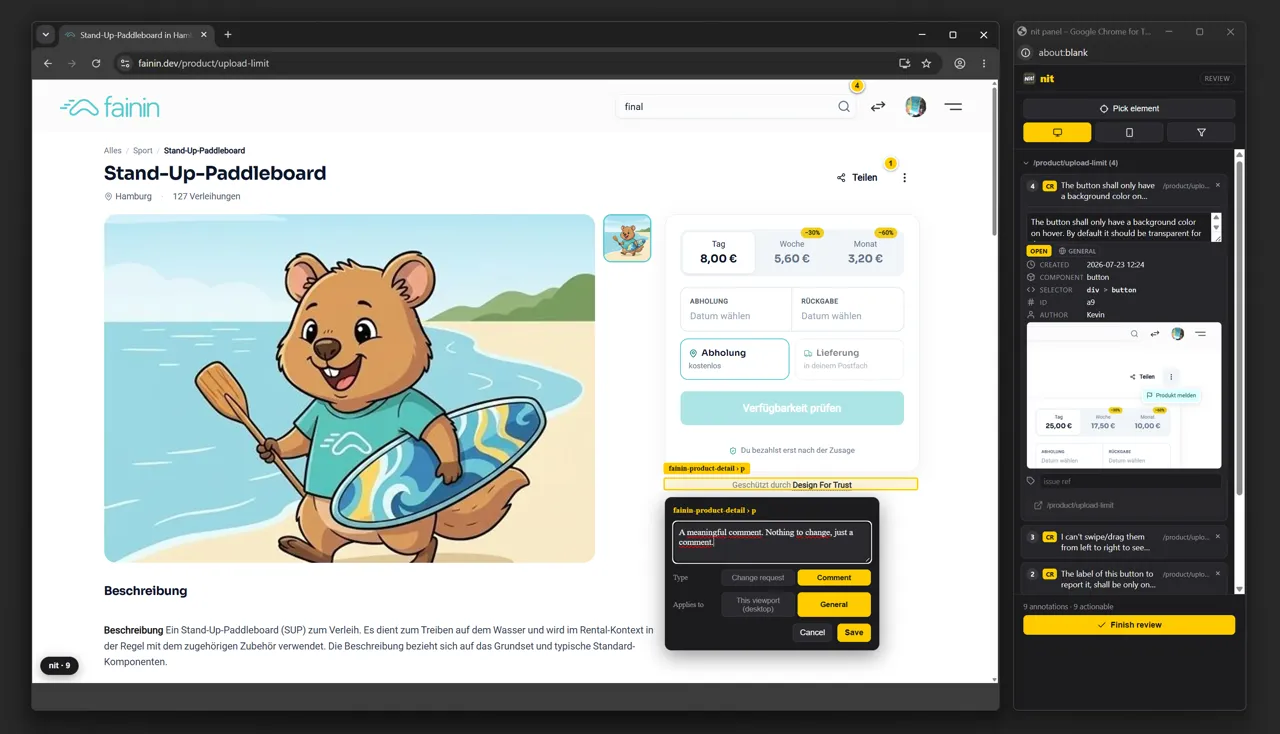
nit is the missing input device for UI work with AI. Alt-click the element, type the nit, done: every annotation records the component tag, a unique CSS selector, XPath, route and viewport plus a screenshot. That is precise enough for a coding agent to find the source without you describing the page again.
Describing small UI issues in prose does not work
You browse your product and spot the little things: a badge in the wrong color, an unfilled star icon, a dead active state. Filing a ticket for that is overkill, so you describe it to your agent in chat, and that is exactly where the precision goes: "the third tile, no, on the landing page, the one under the hero".
The agent cannot see your screen. It needs a reference it can find in the source: which component, which selector, which route, which viewport, and what the spot actually looks like. All of that exists at the moment you click, and it disappears the moment you start turning it into sentences. nit captures it right there.
How it works
Three steps, one loop: annotate, let the agent fix, verify. A reopen sends the item back to step two until the list is empty.
Step 1 - Annotate
nit review https://staging.example.com opens a real Chromium with the annotation overlay and a panel window beside it. Alt-click the element, type the change, save. For states that are hard to reach, like a dropdown or a wizard step, just click your way there: nit records the click trail with the annotation.
Step 2 - Let the agent fix
Hand the nit-review/ folder to your coding agent, or serve it as an MCP server with nit mcp. The agent works through every open change request at the referenced element and marks each one fixed when it is done.
Step 3 - Verify
nit verify walks you through a queue of everything marked fixed: routes are visited automatically, after screenshots sit next to the originals. You rule Verified, Reopen with a note the agent reads, or Skip.
Quickstart
nit needs Node 20.12 or newer and installs its own Chromium the first time you run nit doctor.
npm install -g @spaceparrots/nit
nit doctor
nit setupnit review https://staging.example.com
nit mcp-install
nit verify Or without installing: npx @spaceparrots/nit review https://example.com
What nit does
No dashboard, no project management. nit does one thing: turn a click into a reference a coding agent can act on.
Precise element reference
Every annotation stores a layered reference to the element: the component tag, the Angular class name where available, a CSS selector verified unique at capture time, an absolute XPath, the element text and its classes. Plus the route, the viewport, and the click trail that reproduces hidden states.
MCP server for coding agents
nit mcp serves the review folder over stdio as an MCP server, built on the official SDK. The agent works through nit_list_annotations, nit_get_annotation, nit_mark_fixed, nit_set_status, nit_set_issue_ref and nit_clear_verified, plus resources like nit://review/brief.md for sessions without tool access.
Screenshots with context
Screenshots are CDP element clips taken at pick time and expanded to a minimum 480x360 window centered on the element. Transient states like an open dropdown survive, and the agent sees the element in its surroundings rather than cut out of them.
A verification loop with before and after
nit verify captures after shots under the same rules so they are directly comparable, and walks you through the queue one item at a time. A reopen stores your one-line note as statusReason, so the next agent run knows why the fix fell short instead of guessing.
An overlay any site tolerates
All overlay UI lives in an isolated Shadow DOM and never touches the page's own DOM, styles or scripts. A MutationObserver re-anchors pins after an SPA re-render, annotations are filtered to the current viewport, and anything that cannot be placed is reported with its reason instead of dropped silently.
Several environments, several reviewers
One review folder covers localhost, staging and production, one subfolder per base URL, one MCP server for all of them. On a team everyone reviews on their own, and nit export, import and merge combine the feedback files with per-author attribution.
Who nit is built for, and who it is not
nit fits when
- You write the code yourself or work with a coding agent, and have a terminal open anyway.
- The work is a pile of small UI corrections that are too light for a ticket and too vague for a chat message.
- Your annotations and screenshots should stay in the project folder, with no client data leaving for a vendor.
- You review several environments in parallel and want to keep one single handoff to the agent.
nit does not fit when
- Non-technical reviewers need to annotate themselves. nit is a CLI, it needs Node and an installed Chromium. It is not a link you just open.
- You need comment threads, assignment, notifications or a board. nit has no backend and therefore no shared view; sharing happens through zip files.
- You are looking for a bug tracker replacement. nit is for small, concrete changes to one element, not for features or defect reports with reproduction steps.
- You work a lot inside native <dialog> modals opened with showModal(). Those sit in the browser's top layer above everything, so nit's own popover cannot be clicked from inside them. Pick the element while the dialog is open, close it, then save. Overlay-based dialogs such as Angular CDK or Bootstrap are not affected.
How nit compares to hosted feedback tools
BugHerd, Marker.io and Userback are built for reviewers who never touch code. Vercel Toolbar Comments are built for teams deploying on Vercel. nit is built for the path from the click into the coding agent. The table says where that is an advantage and where it is not.
| Criterion | nit | SaaS feedback tools | Vercel Toolbar Comments |
|---|---|---|---|
| Handoff to a coding agent | MCP server plus fix-annotations.md, the agent writes the status back | The comment lives in the tool, handing it on depends on the vendor or on copy and paste | Comments on the preview deployment, meant for people on the team |
| Element reference | Component tag, CSS selector verified unique, XPath, element text, route, viewport, click trail | Screenshot and element metadata, vendor dependent | A comment attached to an element on the preview |
| Backend or account required | no | yes, hosted backend and an account per reviewer | yes, a Vercel account and project |
| Where the data lives | files in your project folder, sharing as a zip | with the vendor | with Vercel |
| Before/after verification | built in through nit verify | status change, re-checking by hand | resolve the comment |
| Non-technical reviewers | weak: CLI, Node and Chromium required | the strength of the format: only a browser needed | a link to the preview is enough |
| Comment threads, assignment | none | core feature | available inside the Vercel team context |
| Where it runs | any reachable URL including localhost | pages with the snippet or extension installed | Vercel preview deployments |
| Price and license | free under AGPL-3.0, commercial license on request | subscription, typically per user per month | part of your Vercel plan |
To be plain about it: if your reviewers are marketing, QA or the client, the SaaS tools are the better choice. That is exactly what they are built for, and nit is not.
License: AGPL-3.0, plus a commercial option
nit is licensed under the GNU AGPL-3.0. It is free to use, modify and self-host. The copyleft terms apply to network-hosted versions too: if you ship a modified nit over the network, its source has to be available under the same license. That way nobody can take nit closed-source and resell it.
If you need to use nit in a way AGPL-3.0 does not allow, for example embedded in a closed-source or commercial product, a separate commercial license is available. Write to [email protected] and we will sort it out directly.
Missing something? Build it in.
I built nit to automate a step that used to be manual, and to stop quality control from depending on whether I remembered to look. What was missing for me may well be missing in your setup too.
nit is open source, not just source-available. If a selector does not hold in your framework, a command is missing, or the verification flow snags on your setup, open an issue. If you would rather fix it yourself, better still. There are issue templates, a contributing guide and a code of conduct, and I read every pull request.
Frequently asked questions about nit
nit is an open-source CLI tool that lets you annotate a website by clicking on it and hand those annotations to an AI coding agent. Instead of describing a UI change in prose, you click the element; nit records the component tag, CSS selector, XPath, route, viewport and a screenshot. The name comes from code-review culture, where minor comments are prefixed with nit:.
Two ways. Either point the agent at the nit-review/ folder and tell it to follow fix-annotations.md, or register the MCP server once with nit mcp-install. After that the agent works through the nit_ tools directly and marks each finished item fixed itself.
No. The output is plain files in a folder: annotations.json, a readable review.md, the agent instruction sheet and the screenshots. The MCP server is a thin stdio process over the same folder. There is nothing to host and nothing to sign up for.
Any agent that speaks MCP over stdio can connect; the server is built on the official @modelcontextprotocol/sdk and announces its working instructions during the handshake. Agents without MCP support get the same contract from the files, because they can edit annotations.json directly.
nit covers the technical half of those tools: click the element, write the change, capture a screenshot with context, track status, verify. It is open source under AGPL-3.0 and runs locally. What it deliberately does not have is comment threads, assignment and a shared board for non-technical reviewers.
In your project folder, by default under nit-review/. nit setup offers the matching .gitignore entry so reviews stay out of the repository. For sharing, nit export packs the folder into a zip, and nit import plus nit merge bring several people's reviews back together with per-author attribution.
Yes. A review folder covers several base URLs, each in its own subfolder, and a single MCP server serves all of them. Ids are then qualified as staging:a1, and every row carries its base and a navigable url. A review of a single site stays flat and never changes shape.
nit is licensed under AGPL-3.0 and is free to use, modify and self-host, including in commercial projects, as long as you honor the copyleft terms. Those apply to network-hosted modified versions too. If you want to embed nit in a closed-source product, you need a separate commercial license: [email protected].
On your next UI pass, click instead of typing
One npm install, one nit review, and next time your agent gets selectors instead of descriptions.